
Domain Registrant Name Change
Move a .au domain to a new owner, online
A Registrant Name Change (RNC) transfers the licence for a .au domain to a different legal entity, such as a new company, trust or the buyer of your business. You can lodge it yourself in the Approved Systems domain portal in a few minutes.

Before you start
- Your domain portal login
- The domain password (auth code)
- The new owner’s ABN or ACN and details
- Lodge it before the domain expires
When you need one
The domain must belong to the entity that runs the business
Every .au domain is licensed to a specific legal entity, identified by its ABN or ACN. If that entity changes, the domain does not move with it automatically. A Registrant Name Change is needed when:
- a sole trader becomes a company, trust or partnership
- the business is sold, or merged into another company
- the ABN or ACN on the domain has been cancelled or replaced
- the domain was registered under the wrong entity, such as a director personally
A .au domain will only renew if the ABN or ACN linked to it is current, active and belongs to the registrant on record. Fix it before the renewal falls due.
Not the same as updating contact details
Changing the email address, phone number or contact person on a domain does not need a Registrant Name Change. You can update those in the domain portal at any time.
A Registrant Name Change is only for moving the licence to a different legal entity.
Not sure which you need? Look up the domain in the auDA WHOIS and compare the registrant with the business in ABN Lookup.
Step-by-step guide
How to lodge a Registrant Name Change in the domain portal
Log in
Log in to the Approved Systems domain portal.
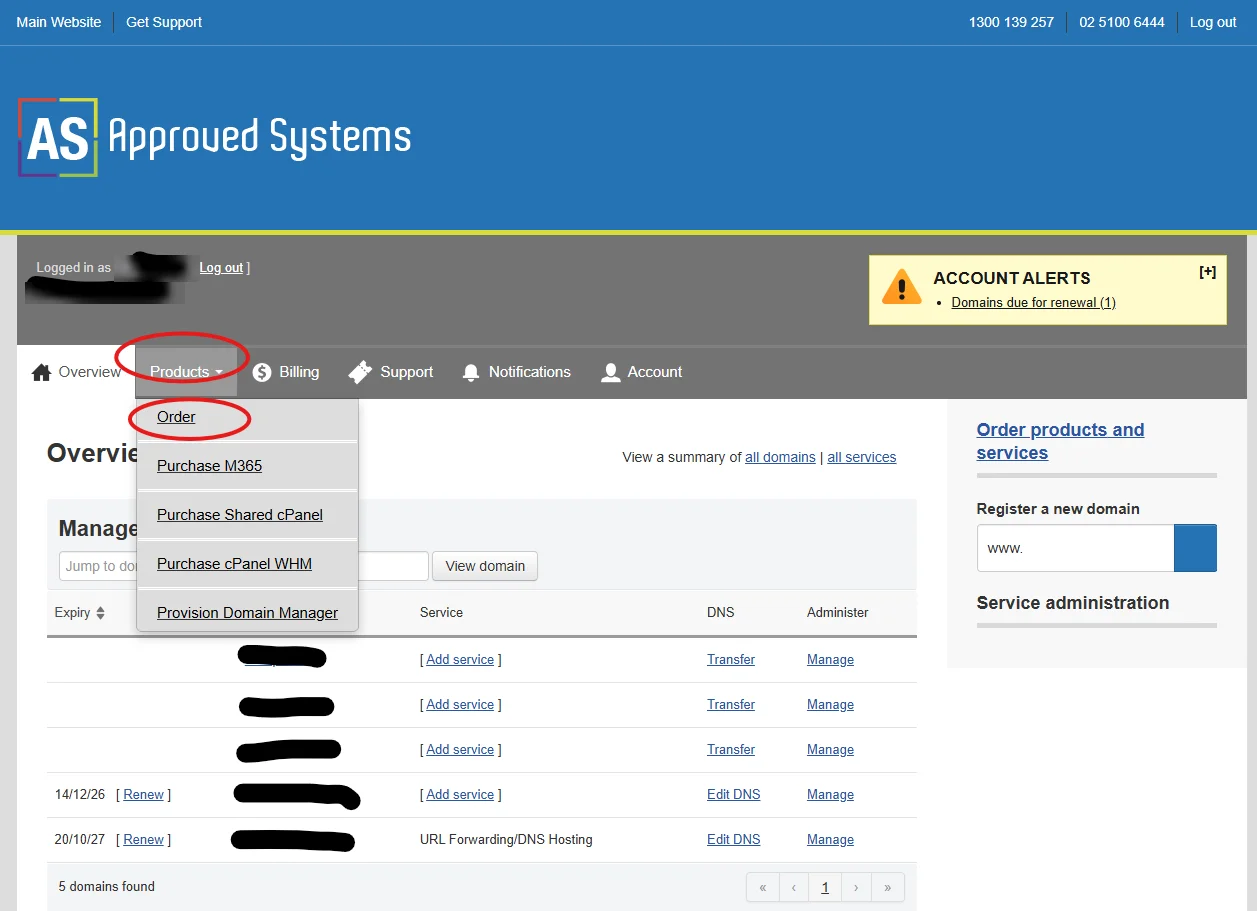
Open the order page
Click the Products tab, then select Order.
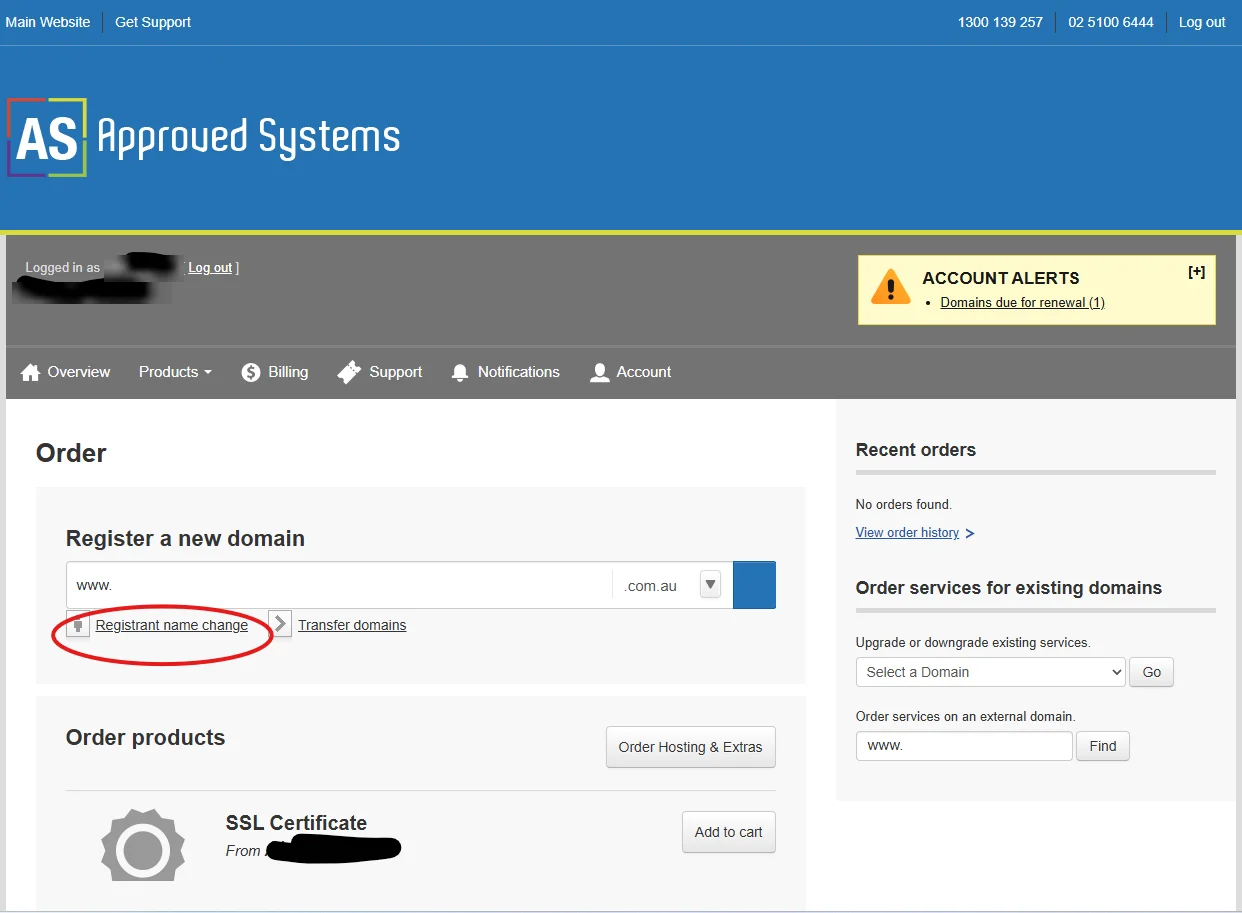
Choose Registrant name change
Under Register a new domain, click Registrant name change.
Enter the domain and password
Enter the domain name and its domain password (auth code), then press Enter.
Add it to your cart
Click Add, then select the domain to add it to your cart.
Choose the new registrant
Select a contact already saved in your account as the new registrant, or add a new contact. Click Continue.
Enter the eligibility details
Enter the new owner’s .au eligibility information, such as the ABN or ACN. Accept the agreement and warranties, then click Continue.
Review and submit
Check the order and payment details, then submit the order.
What happens next
The current registrant must approve the change
- An email goes to the current registrant asking them to confirm or decline the change.
- Once they confirm, the domain is licensed to the new owner and the details are updated.
- A change fee applies. It is set by our domain wholesaler and can change, so check the price shown on the order before you submit it.
Check the registrant’s email address first. If the address on the domain is old or nobody reads it, the approval email will be missed and the change will not go ahead. Update the contact email in the portal before you start, or contact us if you can’t.
Lodge it before the domain expires
A Registrant Name Change can’t be completed on an expired domain. If your renewal is close, or the domain has already been blocked at renewal because the ABN doesn’t match, contact us straight away.
Questions
Registrant Name Change: common questions
Where do I find the domain password (auth code)?
For .au domains, auDA’s password recovery tool sends the domain password to the registrant contact email. If the domain is managed by Approved Systems, you can also ask us and we will send it to the registrant contact.
The previous owner can’t be contacted. What can I do?
The current registrant normally has to approve the change. If the previous owner has closed their business, can’t be reached, or has left the company, contact us with the domain name and what has happened. Ownership has to be verified before anything can change, so allow extra time.
I don’t have a domain portal login.
Email helpdesk@approvedsystems.com.au with the domain name and we will help you get access. If the domain is with another provider, you can transfer it to us first.
Can you do it for me?
Yes. Email helpdesk@approvedsystems.com.au with the domain name, the new owner’s name and ABN or ACN, and the registrant contact details. Our $50 manual request administration fee applies on top of the change fee.
How much does it cost?
The change fee is set by our domain wholesaler and can change at any time, so we don’t publish a fixed price. The current price is shown in the domain portal before you submit the order. If you ask us to lodge it for you, our $50 manual request administration fee applies on top.
Does the website or email stop working during the change?
No. The domain stays in service while the change is processed. Only the licence holder and registrant details change.
helpdesk@approvedsystems.com.au
Help with a Registrant Name Change, a domain password or portal access.
Register, renew and transfer
Search for a new name, renew an existing one, or move a domain to us.