Essential 8 Protect
An affordable Essential Eight baseline for every device
Essential 8 Protect is our managed security service that implements the Australian Cyber Security Centre’s Essential Eight controls and aligns with the ASD Information Security Manual (ISM). It is delivered through our RMM platform and ThreatLocker, for a flat price per device.

Maturity levels 1 and 2
$27.50 per device a month, ex GST
- All eight Essential Eight strategies
- ThreatLocker application control
- Patching, antivirus and backup
- Windows, Windows Server, Mac and Linux
Overview
Baseline defences, managed for you
Essential 8 Protect delivers the baseline defences the ACSC recommends: application allow-listing, patching of operating systems and applications, privilege restriction, macro control, user application hardening, multi-factor authentication and backups.
These controls help defend against ransomware, malware and unauthorised access, and support your obligations under the Privacy Act, the Notifiable Data Breaches scheme, the Security of Critical Infrastructure Act and APRA CPS 234.
It is an ideal entry point for small businesses, government agencies and enterprises lifting their cyber maturity to meet emerging regulatory requirements.
Look for the AS icon in your task tray
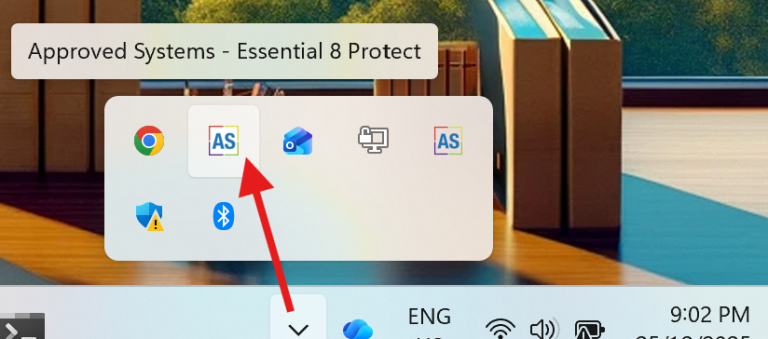
Protected devices show the Essential 8 Protect icon in the Windows task tray, so you and your staff can see the service is in place.
Need more than the baseline? See Fully Managed Essential Eight.
Our core offering
The eight strategies, built in
Application control
Only trusted, approved applications can run. ThreatLocker enforces a pre-approved list and blocks malicious programs from executing.
Patch applications
Critical applications are updated regularly against known vulnerabilities, managed through the Approved Systems RMM platform.
Patch operating systems
Operating system updates applied promptly through our RMM platform, with commercial-grade antivirus, continuous monitoring and automatic remediation.
Restrict administrative privileges
Admin rights are limited to reduce attack paths. ThreatLocker Elevation Control grants them only when needed.
Configure Office macros
Security policies block macros from untrusted sources, preventing malicious macros in Microsoft Office files from running.
User application hardening
Unnecessary features are disabled and security best practice enforced. ThreatLocker Ringfencing™ restricts what applications are allowed to do.
Multi-factor authentication
An extra layer of verification, integrated across your key systems to prevent unauthorised access.
Regular backups
Filesystem backup of up to 250 GB per device included, with additional storage available. Backup is for Windows devices; macOS is coming soon.
Pricing
Simple, per-device pricing
Built on the Approved Systems RMM Enterprise platform. All prices are ex GST, with a minimum of 3 devices and a 12-month commitment.
Essential 8 Protect
$27.50 / device / month, ex GST
- All features of RMM Enterprise
- Application allow-listing and control
- Restrict Office macros
- Patch applications
- Elevation control
- Application ringfencing
Essential 8 Protect
$30.00 / device / month, ex GST
- Everything at levels 1 and 2
- Frequent auditing
- A pathway to maturity level 3 for high-risk assets
Supported on Windows workstations, Windows Server, Mac and Linux. Compare RMM plans.
Advanced security add-ons
Endpoint detection and response (EDR)
- Real-time threat detection and response
- Alerts for indicators of compromise and suspicious activity
Storage control
- Manages data access at the file level
- Prevents unauthorised access to backups and sensitive data
Managed detection and response (MDR)
- 24/7 monitoring by cyber security specialists
- Immediate threat response and mitigation
Why Essential 8 Protect
Enterprise-grade controls at a small business price
Built on Australian Government standards
Implements the ACSC Essential Eight and aligns with the ISM, giving you an auditable baseline.
Managed maturity uplift
Maturity level 1 and 2 controls from day one, a pathway to level 3, and an upgrade to the fully managed service when you need deeper coverage.
Zero-trust by default
Only pre-approved applications and actions are allowed. Everything else is blocked until it is explicitly authorised, stopping ransomware before it starts.
Continuous monitoring
Our RMM platform monitors devices around the clock and remediates common issues automatically. Add MDR for 24/7 human threat response.
Backup included
Up to 250 GB of filesystem backup per device, regularly tested so your critical data can be recovered.
Scales with you
Controls tailored to your risk profile, with add-ons such as EDR and MDR when you need them.
Who it is for
If you hold customer data, this applies to you
Any business that stores names, addresses, email addresses or phone numbers is handling personal information. The Essential Eight helps secure that data and demonstrates due diligence to regulators and customers.
- Healthcare and medical
- Financial services
- Education and research
- Communications
- Data storage and cloud providers
- Transport and logistics
- Energy, water and utilities
- Government agencies
- Corporate and enterprise
- Legal, accounting and consulting
How it protects your business
- Prevents ransomware and malware with proactive application control
- Secures network access and stops unauthorised connections
- Manages user privileges and reduces insider risk
- Blocks dangerous macros and hardens user applications
- Protects backups against tampering and unauthorised access
Not sure where you stand?
Take the 5 minute IT maturity check, or read what the law expects of a business looking after other people’s data.
Get started
Protect your devices with Essential 8 Protect
Tell us how many workstations and servers you have and we will send a quote.
helpdesk@approvedsystems.com.au
Add Essential 8 Protect to devices already on RMM, or add EDR, storage control or MDR.